
Everything around the appraisal, finally in one place.
ASSIST helps residential appraisers manage the operational work around every order: daily priorities, scheduling, revisions, status updates, messages, review requests, files, revenue, payments, team assignments, and marketplace visibility.
You stay the appraiser of record. ASSIST organizes the workflow around the order.
Every feature, one click away.
Tap any feature to jump straight to the details below.
ASSIST IQ
Surface the business patterns most appraisers do not have time to see.
ASSIST IQ looks across your appraisal workflow and surfaces the patterns that are easy to miss when you are buried in orders. It helps identify trends like client volume dropping, turn times increasing, margins slipping by client or lender, revision patterns repeating, workload imbalance across appraisers, and capacity pressure before those issues quietly affect revenue, relationships, reputation, or future order flow.
- Client volume trend alerts when a client who usually sends consistent work starts slowing down
- Margin watch by client, lender, product, or order type when profitability starts slipping
- Revision pattern detection by reviewer, client, appraiser, issue type, or repeated condition
- Turn-time trend visibility across clients, products, appraisers, and time periods
- Workload and capacity signals so overloaded appraisers or teams are easier to spot
- Business-health signals that show what is changing before it becomes obvious
Daily Command Center
Your live operating hub for every order.
Plan the day. Watch the pipeline. Move every order forward.
The Daily Command Center is the screen appraisers can run the day from. It shows what is critical, what is scheduled for today, what is on deck for tomorrow, and what is moving through the pipeline. As orders change status, the Command Center updates with them — so the work stays organized around what needs attention now and what is coming next.
- Critical actions rise to the top so urgent items do not get buried
- Today's schedule shows inspections, contacts, addresses, timing, and next steps
- Tomorrow/on-deck gives appraisers a clear look at what is coming next
- Pipeline items are sorted by due date so upcoming work stays visible
- Orders update live as statuses change throughout the lifecycle
- When an order moves forward, the next task appears in the right place
- Appraisers can plan today, tomorrow, the week, and future workload from one screen
- One-click jump from any item into the full order
Scheduling via Text
Offer your best available inspection times by text — then let the contact choose.
ASSIST lets the appraiser select up to three inspection times that work with their real availability and existing schedule. The property contact receives a text with a scheduling link, chooses the time that works best, and the order updates automatically. If they have a question, they can reply to the text and the message is saved directly in the order communication thread.
- Appraiser selects up to three available inspection time options
- Availability reflects existing inspections and calendar availability
- Property contact receives a text with a scheduling link
- Contact chooses the time that works best
- Order status and inspection details update automatically after confirmation
- Questions and replies are saved directly in the order communication thread
- Helps reduce scheduling back-and-forth
- Helps keep the appraiser's personal cell number private unless they choose to include it
- Editable templates with merge fields and STOP opt-out support
Revision Decoder
Turn dense revision emails into a prioritized checklist.
Revision requests rarely arrive clean. They come buried in long emails, mixed with reviewer notes, conditions, comments, screenshots, and vague asks. Revision Decoder helps turn those requests into a clear checklist with priorities, deadlines, and traceability back to the original message so nothing gets missed on a re-read.
- Original revision request and decoded checklist stay side-by-side
- Captures deadlines, SLA language, and reviewer asks separately
- Priority tagging for high, medium, and low urgency items
- Every decoded item links back to the exact sentence it came from
- One-click conversion into tasks assigned to the right person
- Spots repeated revision patterns from the same reviewer or client
Hi there, hope you're doing well today. I just wanted to circle back on this file and pass along a few notes from our review team after taking a closer look at the report you submitted last Friday. First off, thanks for the quick turnaround — appreciate it as always.
So a couple of things. We noticed that the comps you used are a bit further out than we typically like to see, with Comp 2 sitting at 1.4 miles from the subject — if you have anything closer we'd love to see it. Also for the GLA we're seeing a discrepancy between the sketch (1,842 sqft) and the addendum which says 1,852 sqft, just need that reconciled.
Quick note from compliance — the FHA case number on page 1 doesn't match what we have on file (we show 441-2289176), please correct. Also for the cost approach site value seems light at $42k for this neighborhood, please support or revise.
And one more — the kitchen photos look like only 2 angles, we ask for at least 3. If you have more on file just upload, no biggie.
Let me know if any questions. Thanks again, really appreciate you working with us, the homeowner is hoping to close end of next week.
Reputation Loop
Grow your appraisal brand while the inspection experience is still fresh.
Update the order. Get prompted. Send the review request in one click.
After an inspection or report completion, ASSIST can prompt the appraiser to send a polite review request to the property contact. The message uses the appraiser's approved template, points to the appraiser's own Google Business Profile, and helps their appraisal business build a stronger online presence without adding another manual follow-up task.
Add your Google Business Profile review link once, choose whether requests should go out after inspection or after report completion, and ASSIST keeps the workflow simple. The appraiser decides when to send, the contact receives a clean text, and any reply is saved directly in the order communication thread.
- Helps small appraisal businesses build their Google presence
- Appraiser controls whether to send the request now or later
- Can prompt after inspection or after report completion
- Uses the appraiser's own Google Business Profile review link
- Google review link is added once and reused in future requests
- Sends a polite text to the property contact/POC using the appraiser's approved template
- Replies are saved directly in the order communication thread
- Keeps review follow-up out of the appraiser's personal phone
- Editable templates with merge fields
- STOP opt-out support for text messaging compliance
- 1Order marked Inspected
- 2Prompt: Send review request?
- 3Appraiser selects: Send Now / Remind Later / Skip
- 4Text sent to POC
- 5Reply saved to order
Sent from the appraiser's branded business texting workflow. Replies save back to the order.
Review requests should be sent only when appropriate. Do not offer incentives or ask only for positive reviews.
Free Marketplace
A free way for independent appraisers to be found by the right clients.
The ASSIST Marketplace helps agents, attorneys, lenders, investors, homeowners, and other clients find independent appraisers by property location, appraisal need, product type, availability, and profile details. Requesters enter the property information and assignment need, review matching appraisers, and select up to 3 appraisers to contact. The appraiser receives the introduction and can connect directly with the requester to confirm scope, complexity, timing, engagement terms, and final fee. ASSIST does not take a commission, fee split, assignment fee, or cut from marketplace work. Appraisers keep 100% of what they earn. Marketplace visibility depends on coverage, product fit, availability, profile completeness, listed fee guidance, and request volume. No guaranteed order volume. Marketplace profiles are free for appraisers. ASSIST is not an AMC and does not assign appraisal work, collect a fee split, or take a commission. Appraisers decide whether the request is a fit.
- Free profile for appraisers
- No commissions, no fee splits, no assignment fee
- Requesters enter the property address, property type, appraisal need, timeline, and notes
- Matching appraisers appear based on coverage, product fit, availability, and profile completeness
- Appraiser profiles can show license state, coverage area, products, availability, and standard fee guidance
- Standard fees are shown as guidance for typical assignments; complexity, rush timing, scope, and unusual property factors may change the final fee
- Requesters can select up to 3 appraisers per request
- The cap helps avoid quote blasts and race-to-the-bottom bidding
- Appraisers receive the introduction and contact the requester directly
- Software Only and Software + Service subscribers receive enhanced visibility as the network grows
Requesters can contact up to 3 appraisers so the process stays focused. Appraisers receive an introduction, then decide whether the assignment fits their scope, fee, timing, and availability.
Revenue & Profit Insights
Know which orders, clients, products, and team members actually make money.
ASSIST tracks revenue, compensation, gross profit, margin, client mix, appraiser performance, product profitability, and order-level profitability so appraisal firms can stop guessing where money is being made or lost.
- Revenue, compensation, and profit views
- Performance tracking for turn time, on-time delivery, and revision rates
- Profit by appraiser, product, client, and order
- Revenue reporting by client
- Export-ready data for review and planning
- Action prompts when margins, clients, or payouts need attention
- • Profit margin is up 3.2 pts vs May — Class Valuation orders are driving the lift.
- • Mercury VMP fees haven't moved in 8 months; comp on those files is eating 64% of revenue.
- • 1004 FHA orders deliver 22% higher profit than standard 1004 this quarter.
Active Orders Map
See every active order on a real map of your coverage area.
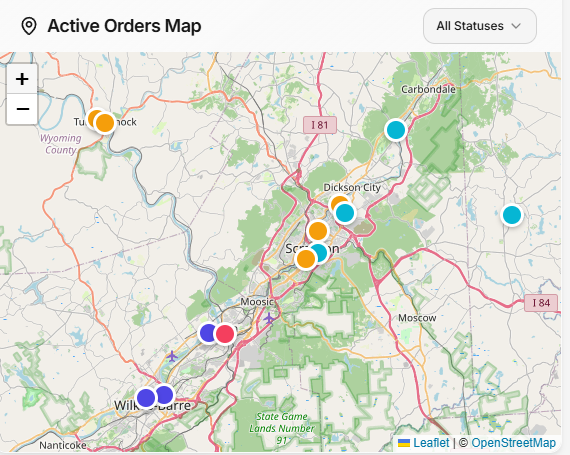
The Active Orders Map gives appraisers and firms a geographic view of open work, inspections, due dates, routes, and clusters. It helps teams plan inspection days, understand coverage, and avoid missing nearby opportunities.
- Live pins for every active order
- Filter by status, appraiser, client, or product
- Click a pin to open the order
- Spot clusters that can be completed in one trip
- Schedule and due-date calendar
- Useful for teams, multi-county coverage, and route planning
Tasking Center
Tasks should tell appraisers exactly what to do next.
The Tasking Center keeps appraisers and teams from relying on memory. Tasks can be generated automatically as orders move through the workflow, or added manually when follow-up, escalation, or reminders are needed.
- Auto-create tasks when order statuses change
- Surface at-risk tasks before they go overdue
- Reassign or escalate in one click
- Defer a task to a later date
- Create ad-hoc personal reminders
- Keep operational follow-up tied to the order
Client Magic Link Portal
Give clients and property contacts one clean link to view progress, message, upload, and pay.
ASSIST can send a polished, branded magic link to borrowers, agents, property contacts, or clients. They can see order progress, send messages, upload plans or documents, and pay fees without creating an account or downloading an app.
- No login required
- Branded with the appraiser or firm's name and contact details
- Live order progress
- Secure document upload
- Two-way messages that mirror the order comments
- Click-to-pay support for cards, ACH, Apple Pay, and Google Pay when enabled
Get Paid Faster
Turn invoicing and follow-up into a one-tap workflow.
For direct-lender and private work, ASSIST helps appraisers draft invoices, send payment links, track outstanding balances, and follow up politely when payments are late.
- Auto-draft invoice when a report is delivered
- Send branded payment link by email or SMS
- Support for card, ACH, Apple Pay, and Google Pay when enabled
- Reminder timeline for 7, 14, and 30 days past due
- AR dashboard showing who owes you and how long it has been open
- QuickBooks-ready export or live sync when enabled
- Jun 12 · ASSISTInvoice + payment link emailed to jordan@pattersontrust.com
- Jun 19 · ASSISTFriendly nudge SMS sent (7-day reminder)
- Jun 26 · Scheduled14-day reminder · firm, polite tone · auto-pause if paid
Photo Organizer
Upload inspection photos, label them once, and download a report-ready ZIP.
ASSIST helps organize inspection photos by room, angle, and label. The label becomes the filename so files can be dropped into report software without manual renaming.
- Drag-and-drop upload from phone, tablet, or desktop
- Standard room labels plus custom labels
- Multiple angles per room
- Clean ZIP ready for ACI, TOTAL, ClickFORMS, SFREP, and others
- Filenames mirror selected labels
- Reduces photo sorting and renaming time













Compensation Engine
Set per-appraiser, per-product, and per-role payout rules.
ASSIST helps appraisal firms manage compensation rules for appraisers, inspectors, writers, reviewers, and other team members. Rules can be based on product, person, role, flat dollar amounts, percentages, rush modifiers, FHA modifiers, complexity modifiers, and min/max caps.
- Per-product, per-role, per-appraiser rules
- Company defaults and appraiser-specific overrides
- Flat dollar or percentage-based splits
- Rush, FHA, complexity, and other modifiers
- Over-allocation warning when compensation exceeds client fee
- Export-ready for payroll and 1099 preparation
Team Assignment & Compensation
Assign the lead, inspector, writer, and reviewer on one order.
Real appraisal work is often a team sport. ASSIST helps firms assign people to each order, calculate compensation from the rule set, warn when total payout exceeds the client fee, and show each person only the parts of the order they should see.
- Assign lead appraiser, inspector, writer, and internal reviewer
- Splits calculated from compensation rules
- Live warning when total compensation exceeds the client fee
- Role-based visibility for payout and order details
- Only the signing appraiser sees AMC portal credentials
- Helps firms control margin before files are marked complete
Workflow Customization
Your firm has a way of working. ASSIST adapts to it.
ASSIST lets firms configure custom stages, statuses, order types, automations, and workflow rules so the platform reflects how the team actually works instead of forcing every firm into the same generic pipeline.
- Custom stages, statuses, and order types
- Auto-create tasks, notifications, and status changes
- Different workflows for different clients
- Per-client and per-product automation rules
- SLA timers and at-risk flags by stage
- Automation rules for inspections, reviews, delivery, and follow-up
- Auto-create task: Update portal status
- Notify reviewer · assign to Priya K.
- Start 24-hour SLA for first draft
- Send review request 6 hours after inspection
Customize Your Order View
See your pipeline the way you actually work.
ASSIST gives appraisers and teams multiple ways to view orders, including list and board views. Users can choose columns, save filters, sort by what matters, and avoid clutter from fields they do not use.
- Toggle between list and board view
- Pick the columns that matter
- Filter by client, appraiser, status, product, or due window
- Sort by any column
- Bulk actions on selected rows
- Saved per user so each person's view fits their workflow
Email Intake + Engagement Letter Parsing
Forward order emails and preserve the original engagement letter on the order.
ASSIST can receive forwarded AMC, lender, and client emails, preserve the original email and attachments, and help create a clean draft order with key fields prefilled from the engagement letter. This keeps intake organized without making email parsing the main product story.
- Private intake mailbox per firm
- Original email and attachments preserved
- Engagement letter PDF stays attached to the order
- Helps prefill client, lender, property, borrower, due date, fee, product, and order details
- Flags missing or ambiguous fields for human review
- Works as a supporting layer behind the broader workflow
- Property
- 142 Maple Ave, Austin, TX
- Borrower
- J. Patterson
- Loan #
- LN-44218-A
- Form
- 1004 (SFR)
- Due
- Jun 24, 2026
- Fee
- $575.00
Google Calendar + Gmail
Two-way Google Calendar and Gmail sync for every team member.
Each appraiser, trainee, and office admin connects their own Google account with a single click. Inspections, deadlines, and follow-ups sync both directions with Google Calendar. Order-related emails thread into Gmail automatically, and replies attach to the right order without copy-paste. A one-click backfill on connect pulls existing inspections from Calendar into ASSIST.
- Per-user Google OAuth — everyone connects their own calendar and inbox
- Two-way Google Calendar sync for inspections, due dates, and reminders
- Gmail threads auto-attach to the matching order
- One-click backfill imports existing Calendar events on connect
- Works alongside Outlook / Microsoft 365 for mixed teams
- Team-wide visibility into who is inspecting what, when
Integrations
Connect the tools your appraisal business already uses.
ASSIST is designed to work alongside common tools for communication, calendar, payments, accounting, storage, signatures, automation, and productivity.
- Calendar and email: Google Workspace, Microsoft 365
- Communication: Slack, Teams, Zoom, Twilio SMS
- Storage: Google Drive, OneDrive, Dropbox, Box
- Payments: Stripe, PayPal, Square
- Accounting: QuickBooks Online (two-way sync)
- Productivity and automation: DocuSign, HubSpot, Notion, Airtable, Zapier, Make
A quiet operations team can help run the workflow inside your rules.
Software Only gives you the tools. Software + Service adds hands-on support for inbox triage, status updates, scheduling texts, portal updates, license and E&O reminders, profile optimization, quote responses, and rule-based order acceptance.
You set the guidelines. ASSIST follows them. Anything unclear or outside scope comes back to you.
Software + Service runs on the same coverage, fee, product, scheduling, client, and escalation rules you provide. The appraiser remains the appraiser of record on every assignment.